What Happens When You Type a url and Press Enter?
Ever wondered what’s going on behind the scenes when you type a URL into your browser and hit Enter? Let’s delve into the intricate dance of systems and protocols that brings the magic of the web to your screen.
1. Input Parsing and URL Interpretation:
When you type in the URL, the browser first checks if it’s a valid URL format. If not, it assumes you’re making a search query and uses the default search engine (like Google) to process it.
2. DNS Lookup:
Before the actual connection to the server is made, the browser must convert the human-readable domain (www.google.com) into an IP address. This is done through a process called DNS (Domain Name System) resolution.
The browser checks:
- Browser cache: Has the site been visited recently?
- OS cache: Maybe another application requested it?
- Router cache: Some routers also store DNS data.
- ISP DNS cache: If none of the above have it, a request is sent to the ISP’s DNS server.
If the ISP’s DNS server doesn’t know the IP, it asks the root DNS servers, followed by the TLD (Top-Level Domain) DNS servers, and finally the domain’s DNS servers. Once the IP address is found, the process traces back to the original request.
3. Establishing a Connection: TCP Handshake:
Next, the browser initiates a TCP (Transmission Control Protocol) handshake with the server’s IP address. This 3-step process ensures both parties are ready for data transfer:
- The client sends a SYN packet.
- The server responds with a SYN-ACK packet.
- The client sends an ACK packet.
4. Secure Connection: SSL/TLS Handshake (for HTTPS):
If the site is using HTTPS, an SSL/TLS handshake is performed to establish a secure connection. This involves exchanging cryptographic keys and agreeing on encryption methods.
5. HTTP Request:
The browser sends an HTTP (or, with HTTPS, encrypted HTTP over TLS) GET request to the server, asking for the website content. This request includes headers with information like browser type, accepted languages, and more.
6. Server Processing:
Google’s server processes the request. Google’s backend has been engineered for fast responses, using distributed systems, caching mechanisms, load balancers, and optimized databases.
Load Balancers:
The first point of contact for the request is usually a load balancer.
1. Distribution of Requests:
Load balancers distribute incoming traffic across multiple servers. Google’s vast infrastructure comprises numerous data centers and servers worldwide. The load balancer ensures that no single server is overwhelmed with too much traffic, ensuring high availability and reliability.
2. Failover:
If a server goes down, the load balancer redirects the traffic to the remaining operational servers.
3. Latency Reduction:
Load balancers can route a user’s request to the nearest geographic server, reducing response time.
Application Servers:
Once the load balancer decides which server should handle the request, it’s passed on to an application server.
1.Processing:
Application servers handle the business logic. For our "www.google.com" request, it involves preparing the main Google search page. While this seems straightforward, behind the scenes, application servers are often handling user sessions, cookies, and more.
2. Dynamic Content Generation:
Unlike static content that can be directly served (like images or stylesheets), the main search page might be customized based on user settings, cookies, or location. The application server generates this dynamic content.
3. Database Interaction:
If there’s a need to fetch or update data, the application server communicates with the database.
Database:
Databases play a pivotal role in storing and retrieving data. For a more complex request, like a search query, Google’s servers need to pull data from their vast databases quickly and efficiently.
7. HTTP Response:
The server sends back an HTTP response, which contains the status of the request (e.g., 200 OK for successful requests) and the website content, typically in HTML format.
8. Browser Rendering
Once the browser receives the content:
- Parsing: The browser parses the HTML, CSS, and JavaScript.
- DOM: A Document Object Model (DOM) is constructed from the parsed HTML.
- CSSOM: A CSS Object Model (CSSOM) is constructed from the parsed CSS.
- Render Tree: Combining the DOM and CSSOM, a Render Tree is built.
- Layout: The browser calculates how much space each element takes up and where it’s located.
- Paint: Colors, images, and other visual elements are painted.
- Composite: Layers are combined and displayed on your screen.
9. JavaScript Execution
If the page includes JavaScript, the browser’s JavaScript engine (e.g., V8 for Chrome) processes and executes it, which may modify the page content or its appearance.
10. Further Interactions
Once loaded, any subsequent interactions, like clicking links or submitting forms, might trigger more requests to the server or run additional JavaScript.
Below is a diagram illustrating the whole process:
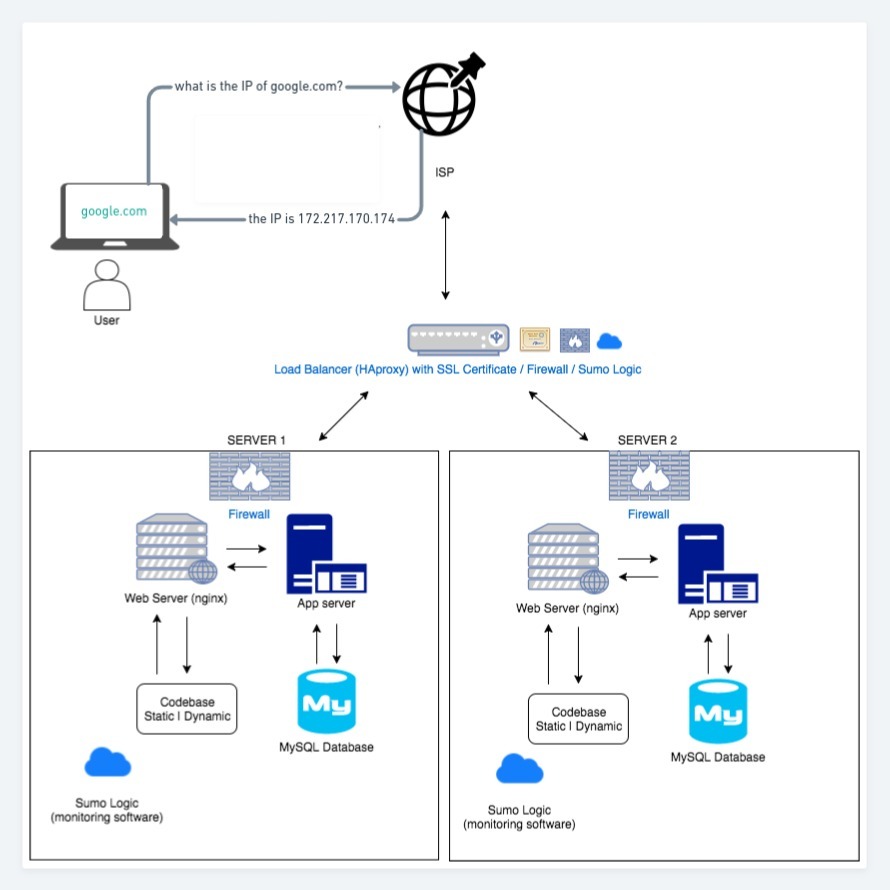
In conclusion, The simple act of typing a URL into your browser and pressing Enter initiates a complex symphony of technology working seamlessly together. The process we’ve walked through happens within seconds and involves a combination of local operations, network protocols, server processes, and browser tasks. The next time you surf the web, you’ll have a deeper appreciation of the intricate ballet taking place behind the scenes.